How to Use Hreflang Tags to Improve Your International SEO

If your website serves audiences in multiple countries or languages, hreflang tags are one of the most important technical SEO elements you can implement. Done correctly, they tell search engines exactly which version of your content to show to which audience — preventing duplicate content issues and dramatically improving your international search visibility.
Table of Contents
What is Hreflang and Why Does It Matter?
Hreflang tags are HTML attributes added to the <head> of web pages that provide signals to search engines indicating there are alternate versions of the page. These alternate versions typically contain translated content in different languages, or regionally targeted content for different countries.
For example, if you have a page in Spanish targeting Mexico, you might want a different version for users in Spain. Both pages may be in Spanish, but the content, offers, or messaging might differ by region. Hreflang tags are how you tell Google and other search engines about that distinction.
Why Hreflang Matters for International SEO
- Prevents duplicate content penalties. When multiple versions of the same page exist in the same language (e.g., en-US and en-GB), Google may see them as duplicates. Hreflang signals explain the intended audience for each.
- Improves user experience. Users in France see the French version. Users in Germany see the German version. Fewer bounces, higher engagement.
- Consolidates ranking signals. Rather than splitting link equity across language variants, hreflang helps Google understand they are alternate versions of the same page.
- Reduces cannibalization. Without hreflang, your en-US and en-GB pages may compete against each other in search results for the same queries.
Anatomy of a Hreflang Tag
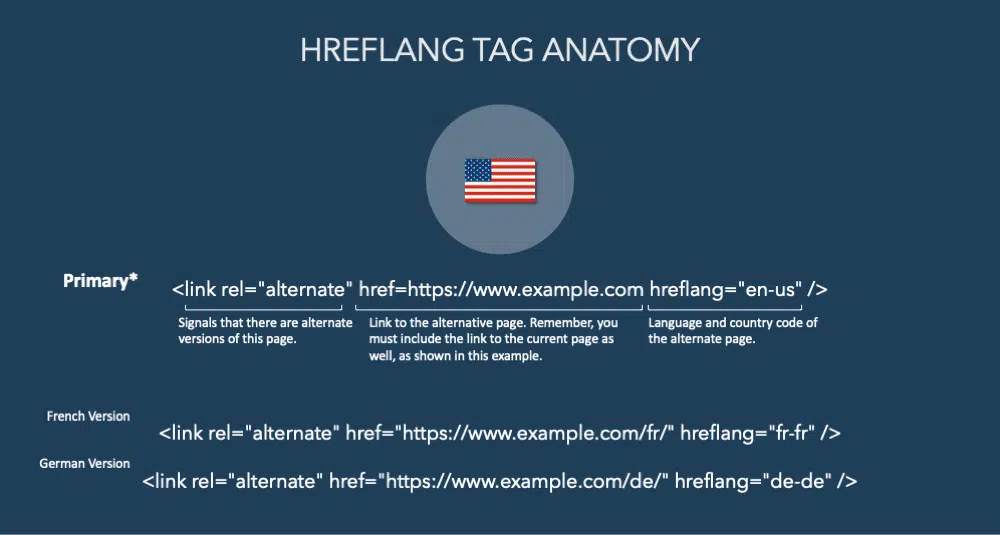
The structure of a hreflang tag is straightforward once you break it into its three core components.
Note that the language code alone (e.g., hreflang="en") targets all English speakers regardless of country, while a combined code (e.g., hreflang="en-us") targets English speakers in the United States specifically.
How to Implement Hreflang Tags
Whenever you implement hreflang tags on your site, there are two critical rules you must follow without exception:
Rule 1: List All Alternate Versions in Separate Tags
Every language and regional variant of the page must have its own <link rel="alternate"> tag. If you have a page in English, French, and German, you need three separate hreflang tags on each version of the page.
Rule 2: Include the Current Page as One of the Alternates
This is the most commonly missed rule. Each page must include itself in its own hreflang annotations. The tags must be reciprocal — every page in the set must reference all other pages in the set, including itself.
Here is what a complete, correct hreflang implementation looks like for a site with English (US), French, and German versions:
<!-- On the English (US) page -->
<link rel="alternate" hreflang="en-us" href="https://example.com/en/" />
<link rel="alternate" hreflang="fr-fr" href="https://example.com/fr/" />
<link rel="alternate" hreflang="de-de" href="https://example.com/de/" />
<link rel="alternate" hreflang="x-default" href="https://example.com/" />

<!-- The SAME four tags must appear on the French page too -->
<!-- And on the German page. All pages reference all pages. -->
- The English (US) page includes itself (
en-us) and all other variants - The French page must have identical tags pointing back to all versions, including the en-us page
- If page A references page B, page B must reference page A — Google calls this "return tags"
- Missing return tags cause Google to ignore the hreflang annotations entirely
| Requirement | Details |
|---|---|
| Use absolute URLs | Relative URLs are not supported — always include the full domain |
| Self-referencing tag | Each page must include a hreflang tag pointing to itself |
| Reciprocal tags | If A references B, B must reference A |
| Consistent canonical | The canonical tag and hreflang tag on each page must agree |
| Valid language codes | Use ISO 639-1 language codes and ISO 3166-1 country codes |
| x-default tag | Include for a catch-all fallback URL for unmatched regions |
Where to Place Hreflang Tags
There are three supported methods for implementing hreflang. For most websites, the HTML head method is the easiest. For large sites or those with CMS limitations, the XML sitemap method may be more practical.
Method 1: HTML <head> (Recommended)
Place <link rel="alternate"> tags directly in the <head> section of each page. This is the most common and widely supported approach. Best for: sites where you control the HTML template.
Method 2: XML Sitemap
Add hreflang annotations directly to your XML sitemap using the xhtml:link element. Best for: large sites with thousands of pages where editing individual page templates is impractical.
Method 3: HTTP Headers
Return hreflang information in the HTTP response headers. Best for: non-HTML files like PDFs. For standard HTML pages this method is rarely used.
Don't mix methods across the same page. Using both HTML tags and sitemap annotations for the same URL can cause conflicts. Pick one method and apply it consistently site-wide.
Language and Country Codes
Hreflang values use ISO 639-1 two-letter language codes and optionally ISO 3166-1 Alpha-2 two-letter country codes. The language code is required; the country code is optional but recommended when you have region-specific variants.
| Hreflang Value | Targets |
|---|---|
en | All English speakers (any country) |
en-us | English speakers in the United States |
en-gb | English speakers in the United Kingdom |
es | All Spanish speakers (any country) |
es-mx | Spanish speakers in Mexico |
es-es | Spanish speakers in Spain |
fr-fr | French speakers in France |
de-de | German speakers in Germany |
zh-hans | Simplified Chinese |
zh-hant | Traditional Chinese |
x-default | Fallback for users with no matching region |
Language codes are case-insensitive, but by convention language codes are lowercase (en) and country codes are uppercase (US). Both formats are accepted by Google.
Using x-default for Fallback Pages
The x-default value is a special hreflang tag that tells search engines which URL to serve when no other language or regional variant matches the user's location or browser language settings.
<link rel="alternate" hreflang="en-us" href="https://example.com/en/" />
<link rel="alternate" hreflang="fr-fr" href="https://example.com/fr/" />
<link rel="alternate" hreflang="x-default" href="https://example.com/" />
<!-- A user in Japan (no ja version) would be served example.com/ -->
Common uses for x-default include pointing to a language selector page, your international homepage, or your most broadly targeted language version. It's optional but strongly recommended.
Common Hreflang Mistakes
Hreflang is notoriously easy to get wrong. These are the mistakes that cause hreflang to be silently ignored by Google.
Missing return tags. If your en-US page references your fr-FR page but the fr-FR page doesn't reference the en-US page back, Google will ignore both annotations. Every page in a hreflang set must point to every other page in the set.
Using relative URLs. Hreflang requires absolute URLs. /en/page/ will not work — use https://example.com/en/page/.
Invalid language or country codes. Using hreflang="english" instead of hreflang="en" will cause the tag to be ignored. Always use official ISO codes.
Hreflang pointing to a page with a conflicting canonical. If your hreflang tag points to Page A, but Page A has a canonical pointing to Page B, Google will follow the canonical and may ignore the hreflang. Ensure canonicals and hreflang tags are consistent.
Only implementing on some pages. Hreflang is an all-or-nothing implementation. If you add it to your homepage but not your product pages, you'll get inconsistent results. Implement it across all equivalent pages in your site.
Key Takeaways
- Hreflang tells search engines which language/region version of a page to serve to which audience — it's essential for any site targeting multiple countries or languages.
- Every hreflang annotation must be reciprocal. All pages in a set must reference each other, including themselves.
- Always use absolute URLs. Relative paths are not supported and will cause the tags to be ignored.
- Use
x-defaultto define a fallback page for users whose language/region isn't explicitly targeted. - Canonical tags must agree with hreflang tags. Conflicting signals cause Google to ignore your hreflang implementation.
- Validate your implementation using Google Search Console's International Targeting report or a dedicated hreflang testing tool.
Need help with international SEO?
Whether you're launching in a new market or fixing a broken hreflang implementation, I work directly with enterprise teams to get it right.
Request a Consultation